Pages

Showing posts with label dsdn142_p3_hand_in. Show all posts

Friday, October 19, 2012

Interaction - Creative Coding 142

Final...

Just a compilation of what my interaction can do.
My final interaction uses the mouse to create different aesthetic kinetic images.
This interaction I explored the difference between control and interaction. My design does include some control after you have discovered all the various interactions that the mouse can provide, but there are endless variation that be created thus only making it partial control. And once you click the mouse buttons and the particles start to act uncontrollably makes for a fun and unexpected experience.
This is my final and its called THE BIG BANG!!!

Interaction - Creative Coding 142

Development Continued...

Presentation 2.0:


Depending on what end of the scene you are the size of the circles change. These images are ordered from the left to the right side of the scene. This change of sizing weirdly reminded me of like particles floating around in a nucleus or something along those lines.


Going back to idea of comets which relates to space I thought of stars and many other things to do with space and one of those things were a supernova and supernovas includes particles that float around. Thus the blue and red represent different particles. The blue also represent the icy coldness of a supernova and the red the fiery heat of a supernova.


I also decided to add in another feature that the particles tail (speed) changes depending on whether you  are at the top or bottom of the scene are.

Thursday, October 18, 2012

Interaction - Creative Coding 142

Development...

Presentation:

Changed the code so that the creatures has a tail. I also changed the creatures to different sizes as not all creatures are the exact same size. And changed the background to black as to represent space as I found that the tail made the creatures look like comets.

Colours:
When the scene is clicked the creatures/comets would become angry/misbehave. I found that the these warm colours illustrated the heat of comets.


Experimented with the background colour just to see what it would look like to have it a lighter colour.
It looked alright, but when I clicked the colour just didn't match. So I scratched this idea.

I then experimented with the keyboard keys so that when you click any key the comets would appear instead of clicking. I also changed the expressive colour to just red so that I didn't have a whole pallet of colours.

I change the command back to clicking as I thought it gave a more aesthetically pleasing image.


I decided that my interaction needed more commands so I added in keyboard commands so that when you press the arrow keys the comets would move up, down, left and right. And you could always move it back as the comets don't disappear but only disappear from the scene.

Wednesday, October 10, 2012

Interaction - Creative Coding 142

Inspiration...

Creatures:


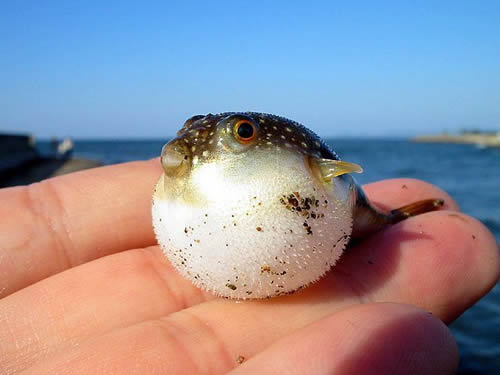
To continue on the circular shape into a sea creature I thought of puffer fish. They are sensitive creatures that are easily frightened and works into my interaction that when the scene is clicked on all creatures become angry or in this case frightened...


Friday, October 5, 2012

Interaction - Creative Coding 142

A Work in Progress Continued...

Bubbles/Creatures:

Improved code of my floating bubbles.


I changed the background colour to blue to simulate the blue sky. Then I thought that the blue could also simulate water and that the bubbles were a creature rather than a bubble. I added in a sort of vibration function so that when you click on the scene all creatures would vibrate and change to red as if they are angry.

Friday, September 28, 2012

Interaction - Creative Coding 142

A Work in Progress...

The Bubbles:

+ Code so far...

My idea when starting this code off was to make the bubbles fall at different rates. I done this with the help of my friend who talked me through the process of floats and now I understand it a bit better than before. I made my idea happen and thought that I didn't want my bubbles to disappear off screen so I gave my bubbles boundaries. At this stage though the bubbles were just moving up and then down and then up and so on. Then all of a sudden it hit me that bubbles don't float down but up. So I adjusted my code so that the bubbles would come up out of the screen. I then also made my bubbles move and bounce off the side boundaries as bubbles have no real direction but up. The bubbles are still moving to fast which is a problem I still need to fix.

Interaction - Creative Coding 142

Experimentation Cont...

Rain:

While looking on the Open Processing site I came across this loop where the circles fall and pop at the bottom and more falls down from the top. I used this persons code and changed it so that the circles are bigger and come down more slowly. I want to experiment a similar thing into my code design.

Rows:

Firstly I wanted to make my circles drop and so I made a loop for more circles and then used the same code as earlier when I made the 1 circle drop. I got that working and wondered whether I could do the same but only across the screen. So adapted my code and got it to move across too.

Interaction - Creative Coding 142

Experimentation Cont...
Movement:
In class we were showed how to make a shape follow your mouse and so I tried it out myself. However it made several circles as I had not redrawn the background in void draw function.

So added in the background under the void draw function and so now only the on ellipse is following my mouse because the background is redrawn in 60 frames per second.

Interaction - Creative Coding 142

Experimentation...

Spherical:

After researching bubbles I wondered whether i could make a sphere on processing rather than a circle, as bubbles are usually spheres. So I played around and made a sphere that was able to move down the screen. But before being able to move the sphere down the screen I needed to create the code first and so I created an ellipse first to get the code right...
Once I figured out how to make the circle drop I introduced that piece of code to the sphere.

Friday, September 21, 2012

Interaction - Creative Coding 142

Inspiration

Bubble Wrap:

I had a brainwave about this game i once played online. It was rather silly but enjoyable because who doesn't love to pop bubble wrap? Not sure of the website I first saw it on, but here is a good enough one... http://www.puffgames.com/bubblewrap/
I want to explore something alone the lines of bubbles. There is just something about them, maybe it is the destruction of something beautiful that can never be healed.

Bubble Wrap 2.0:

I thought I'd just put up this image as it show that something beautiful with the light reflecting off the surface, revealing the innocence of the translucency in its crinkled aesthetics.
I also really love the light fluffy colours which are the pastel blues, pinks and purples. This image is also colour inspiration for my interaction.

Bubbles:

I found that water bubbles are rather a fascinating thing that you can stare at for ages as it is so entrancing. I am using the directional movement of the bubbles as inspiration for the direction that my interaction might adopt.

Bubbles 2.0:

This image is gorgeous as the leaves of the the tree look like golden flakes floating among the bubbles due to the angle of sun light hitting the leaves. Also hitting the bubbles that they show off those amazing pastel colours from the bubble wrap. So I had saved the best for last in my few precedented images here. This image is so enrapturing and I can stare at it forever. 

Tuesday, September 18, 2012

Interaaction - Creative Coding 142

Concept Ideas...

With this concept you have a cone shape that has to catch the shapes falling down and you move the cone across the bottom of the creen with the left and right arrow keys on the keyboard. the more you catch the faster the shapes fall and changes colour from cool colours to warm colours to indicate the urgency. Also the further you are into the interaction it could explode at any time catching you off gaurd. I was also thinking that you would have a random shape fall that if you catch it it would also explode.

With this concept shapes come out from thethe center out and you have a bar that  catches the coloured row that the background indicates. So if you catches the wrong coloured row it pops against the side. You'll use six different keys on the keyboard to move to the different rows as the background colour colour changes around.

With this concept kind of mixed the first to concepts together. The squares will pop randomly up on the screen. As you click the squared the main square will grow and changel in colour the further you are into the interaction. The squares wil start poppin up faster and faster and if you click a red one your main square pops and goes back to its original size again. Also when the square start to change to red when you have clicked too many squares it will also pop.